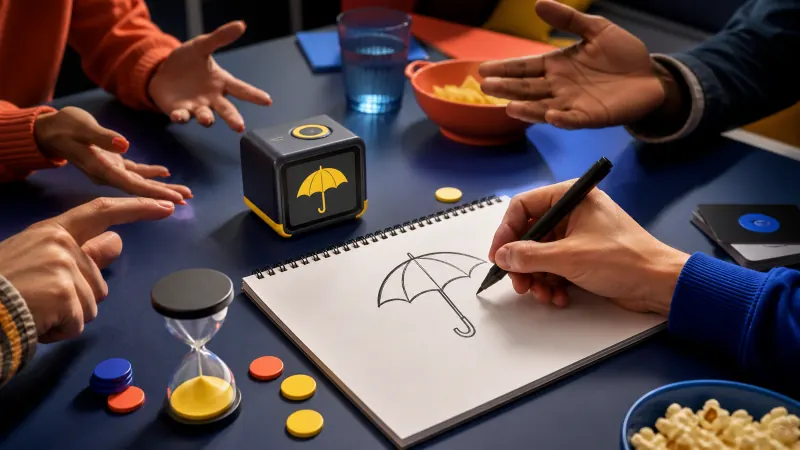
A random object generator is a small tool that picks a real-world thing — an umbrella, a teapot, a bicycle — out of a large curated list and shows it to you. Instead of staring at a blank page trying to think of "something to draw" or "something to guess," you press a button and the tool hands you a concrete noun to work with.
That sounds almost too simple to matter. In practice it removes the single most expensive step in creative work: deciding where to start. This guide explains what these tools actually do, where the objects come from, who uses them and why, and how to tell a good generator from a throwaway one.
What a Random Object Generator Actually Does
Strip away the interface and every random object generator performs the same three steps. It holds a list of object names, it selects from that list unpredictably, and it presents the result in a form you can use.
What separates tools is the quality of each step. A generator built on a list of 60 words will repeat itself within minutes. One that pulls from a curated pool of several hundred concrete, drawable nouns can run for weeks of daily use without feeling stale. The Object Generator tool draws from more than 560 objects across fourteen categories for exactly this reason.
The word object is doing real work here. These tools deliberately exclude abstract nouns. "Freedom," "progress" and "nostalgia" are words, but you cannot sketch them, mime them or place them on a table. Restricting the pool to physical things is what makes the output immediately usable.
Where the Objects Come From
Good generators do not scrape a dictionary. They use a hand-checked list, because an unfiltered word source produces results nobody can use: proper nouns, plurals, technical jargon, and words that are technically objects but hopelessly obscure.
A well-built pool is filtered on a few practical tests:
- Is it physical? You should be able to point at one.
- Is it recognisable? Most people should picture the same thing on hearing the word.
- Is it drawable? It needs a distinctive silhouette, not just a name.
- Is it safe for a general audience? Classrooms and family game nights are common use cases.
Categories then sit on top of that pool. Filtering to Nature, Food, Tools or Kid-Friendly narrows the results without shrinking them to a handful of repeats. If you want to understand how the selection itself works under the hood, the mechanics are covered here.
Who Uses One, and What For
The audience is wider than most people expect, and the reasons are surprisingly consistent.
Artists and Illustrators
Drawing improves with volume, and volume dies when you spend ten minutes choosing a subject. A generator turns that decision into a button press. Many illustrators run a warm-up of five to ten objects before their real work, or build a daily drawing challenge around one prompt a day.
Teachers
An object generator is an infinite, zero-prep flashcard deck. It supports vocabulary drills, descriptive writing, speaking practice and quick-fire games, and because the tool chooses, no student can claim the prompt was unfair. Practical lesson structures are covered in our guide to classroom use.
Game Players
Pictionary, charades, storytelling games and improv all run on prompts. Printed card decks get memorised; a generator never does. It also settles arguments, since the word came from a machine rather than a player.
Writers and Designers
A random object is a constraint, and constraints break creative deadlock. Writers use one as a story seed or a character's possession. Designers use the technique — sometimes called random input or forced association — to escape the obvious solution to a brief.
The value is not the object itself. It is that the decision has already been made for you, so the only thing left to do is start.
What Separates a Good Generator From a Poor One
Most tools look identical on the surface. The differences show up after ten minutes of real use.
| Feature | Why it matters |
|---|---|
| Pool size | A small list repeats quickly and stops feeling random. |
| Curation | Filters out abstract, obscure and unusable words. |
| Batch generation | Lets you draw a whole session of prompts in one press. |
| No-repeat option | Guarantees every object in a batch is unique. |
| Category filters | Matches the pool to the lesson, game or study. |
| Seeds | Reproduces an exact set so a group can share prompts. |
| Export | Turns results into worksheets, cards or image files. |
Seeds deserve particular attention, because they quietly convert a solo tool into a collaborative one. Two people who enter the same seed receive the same objects in the same order, which is what makes shared challenges and synchronised classroom activities possible. Seeds are explained in full here.
Object Generator or Word Generator?
The two are often confused. A random word generator returns any word at all — verbs, adjectives, abstractions. That breadth is useful for naming exercises and vocabulary work, but it is a poor fit for drawing or charades, where roughly half the results will be unusable.
Choose an object generator when the output has to be something you can picture. Choose a word generator when you want linguistic range rather than physical form. The full comparison is here.
Frequently Asked Questions
Is a random object generator really random?
The selection is pseudorandom: it comes from a mathematical formula rather than a physical noise source. For creative and educational purposes the distinction is irrelevant — the results are unpredictable to you, which is all that matters.
Do I need to install anything?
No. A browser-based generator runs entirely on your device. There is nothing to download, no account to create, and your settings never leave your computer.
Can I use the results commercially?
Object names are ordinary English words and cannot be owned. Prompts generated for lessons, worksheets, streams or client work are yours to use freely.
How many objects should I generate at once?
One for a focused study, five to ten for a warm-up, and sixteen or more for a full class or game session. Being able to draw a batch in a single press is what turns the tool into a lesson-planning shortcut.
Start With One Object
The fastest way to understand a random object generator is to use one. Open the Object Generator, pick a category that suits what you are doing, and draw a single object. Then draw ten. The moment you notice you have started working instead of deciding, the tool has done its job.